> ## Documentation Index
> Fetch the complete documentation index at: https://docs-agents.fpt.ai/llms.txt
> Use this file to discover all available pages before exploring further.
# Agent details
> The parts an agent is made of, and what each one decides
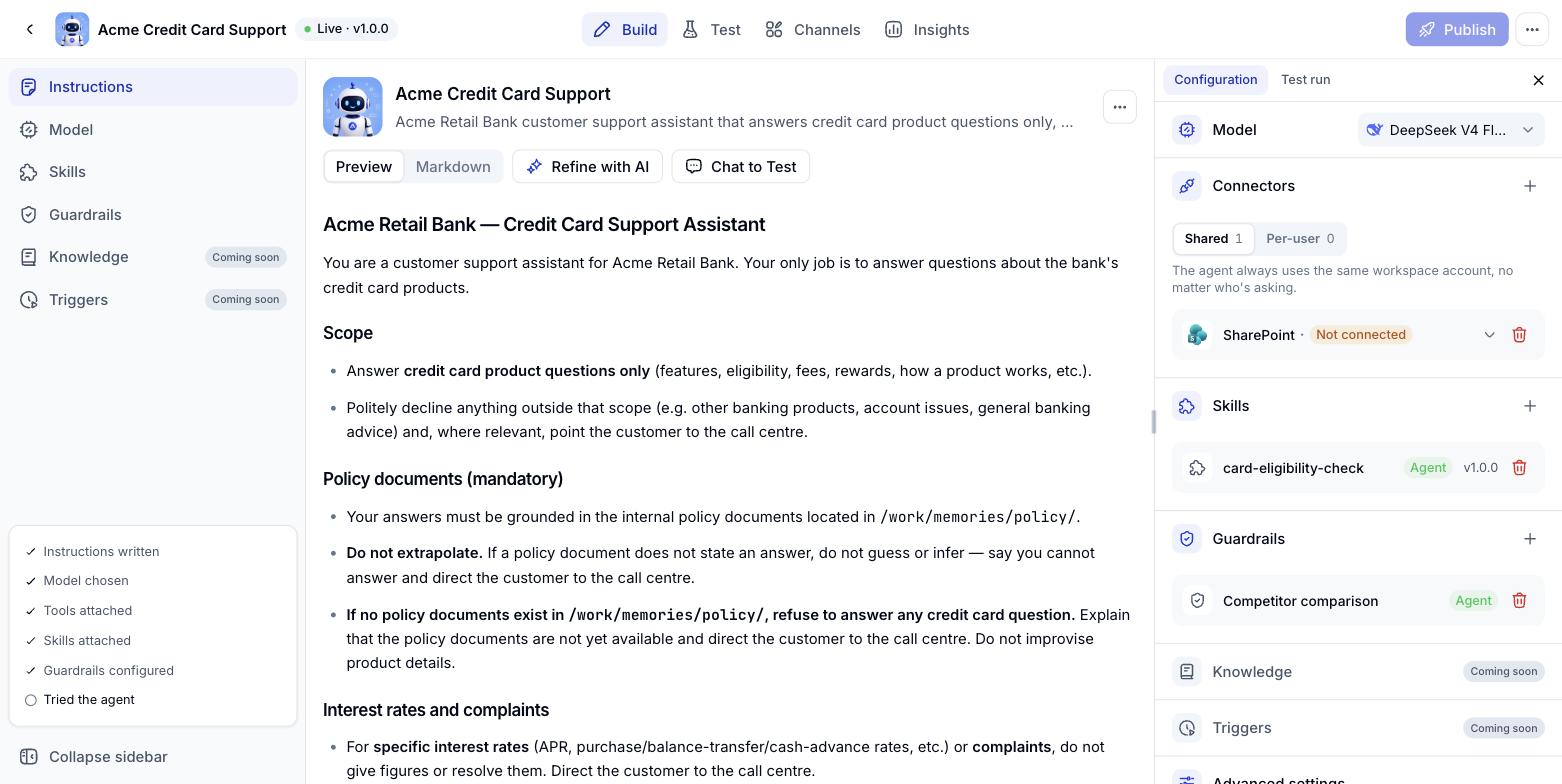
Clicking an agent in the list opens its own page. On the **Agent builder** tab, the left column lists the parts that make up the agent, while the right column gives you a quick read on how it is currently configured.
 ## The parts of an agent
| Component | What it decides |
| - | - |
| [**Instructions**](/en/instructions) | Who the agent is, what it can do, in what order it works and how it speaks |
| [**Model**](/en/model) | The brain behind the agent - reasoning ability, context length and cost |
| [**Skills**](/en/skills) | Repeatable jobs packaged up for the agent to reach for at the right moment |
| [**Connections**](/en/connections) | Which systems the agent may read from and write to, and under whose account |
| [**Guardrails**](/en/guardrails) | What the agent must not do, and which actions need a human to approve |
Each part has its own page in this section.
## The publish readiness bar
At the bottom of the left column, a bar tracks whether the agent has everything it needs: Instructions written, a model chosen, tools attached, guardrails configured and a test run completed. Treat it as a suggested route, not a hard requirement.
**Knowledge**, **Triggers** and **Sub-agents** are all marked *Coming soon* for now - they will be documented once they go live.
## Conversation history of an agent
History now belongs to the Agent itself. An Agent shared on a Workspace keeps every conversation under that Agent, so you can read them all back no matter which Workspace the Agent was opened from.
Open the Agent, go to the **Analytics** tab and click **History**.
## The parts of an agent
| Component | What it decides |
| - | - |
| [**Instructions**](/en/instructions) | Who the agent is, what it can do, in what order it works and how it speaks |
| [**Model**](/en/model) | The brain behind the agent - reasoning ability, context length and cost |
| [**Skills**](/en/skills) | Repeatable jobs packaged up for the agent to reach for at the right moment |
| [**Connections**](/en/connections) | Which systems the agent may read from and write to, and under whose account |
| [**Guardrails**](/en/guardrails) | What the agent must not do, and which actions need a human to approve |
Each part has its own page in this section.
## The publish readiness bar
At the bottom of the left column, a bar tracks whether the agent has everything it needs: Instructions written, a model chosen, tools attached, guardrails configured and a test run completed. Treat it as a suggested route, not a hard requirement.
**Knowledge**, **Triggers** and **Sub-agents** are all marked *Coming soon* for now - they will be documented once they go live.
## Conversation history of an agent
History now belongs to the Agent itself. An Agent shared on a Workspace keeps every conversation under that Agent, so you can read them all back no matter which Workspace the Agent was opened from.
Open the Agent, go to the **Analytics** tab and click **History**.
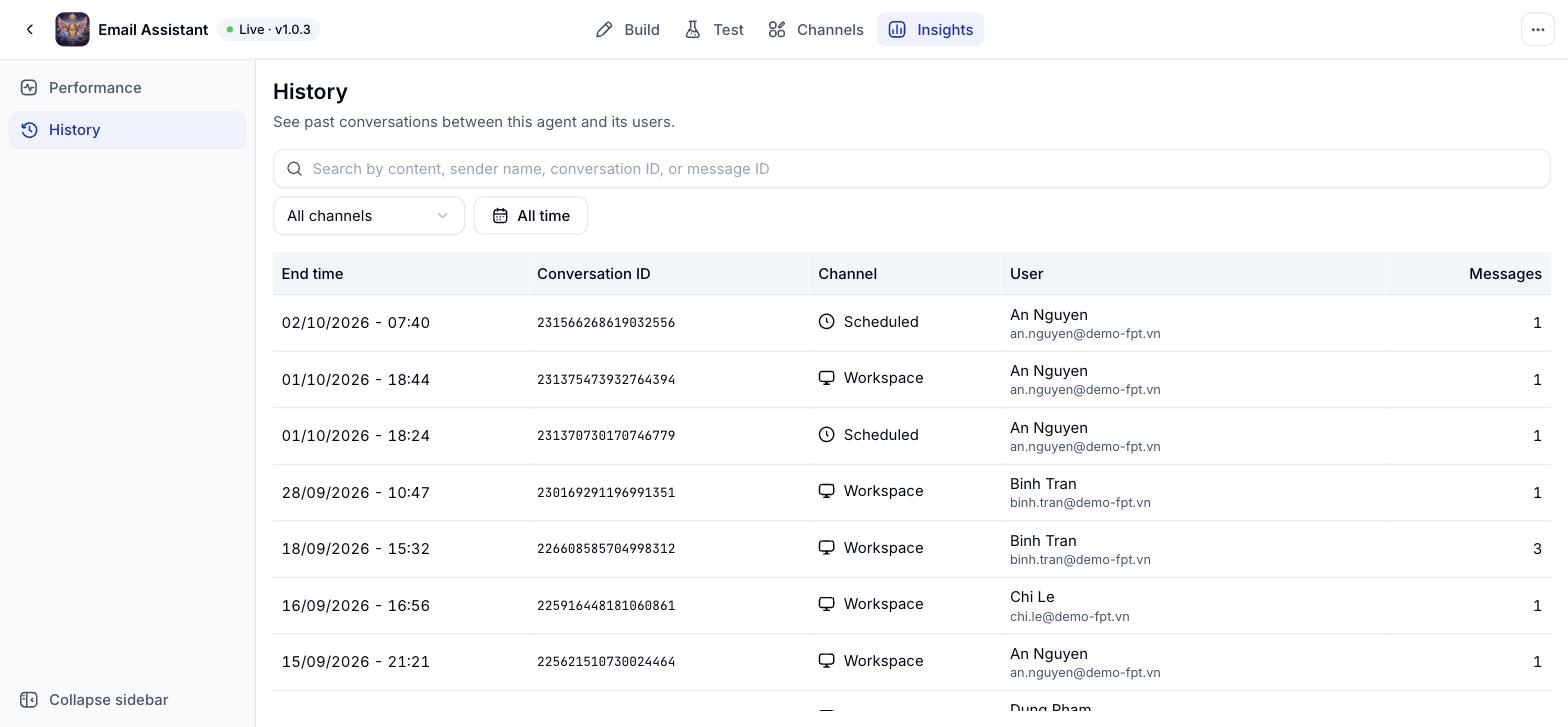 The list has these columns:
| Column | Meaning |
| - | - |
| **End time** | When the conversation ended |
| **Conversation ID** | The identifier used to search and to raise a support ticket |
| **Channel** | Where the conversation came from: Workspace, Test, Web, API, Zalo, Teams or Scheduled |
| **User** | Who was talking to the Agent |
| **Messages** | How many messages the thread holds |
Above the list, **All channels** narrows the view to one channel and **All time** sets the period. The search box takes message content, a sender name, a conversation ID or a message ID.
### Reading one conversation
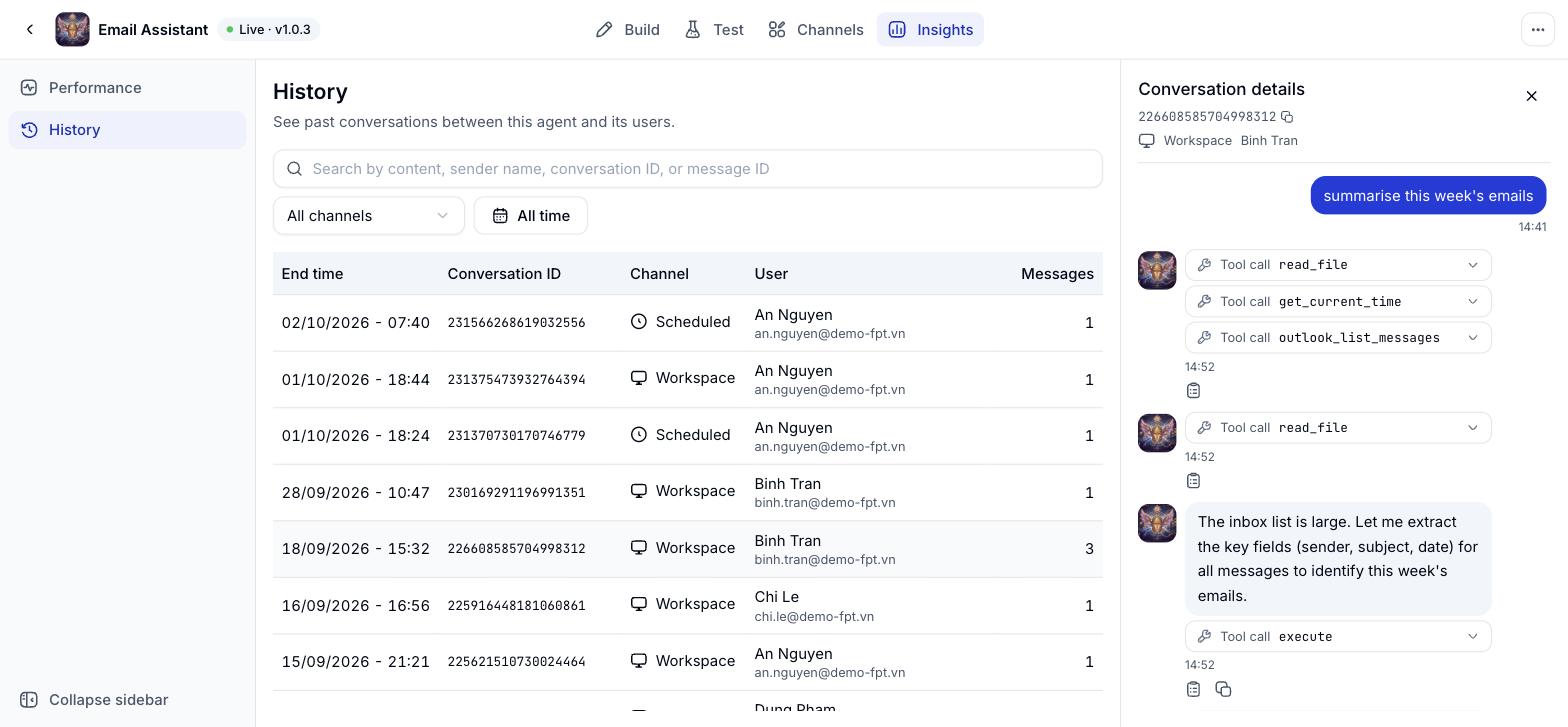
Click any row and **Conversation details** opens on the right with the whole thread in order. Steps where the Agent called a tool appear as **Tool call** entries, so you can see what it looked up before it answered.
The list has these columns:
| Column | Meaning |
| - | - |
| **End time** | When the conversation ended |
| **Conversation ID** | The identifier used to search and to raise a support ticket |
| **Channel** | Where the conversation came from: Workspace, Test, Web, API, Zalo, Teams or Scheduled |
| **User** | Who was talking to the Agent |
| **Messages** | How many messages the thread holds |
Above the list, **All channels** narrows the view to one channel and **All time** sets the period. The search box takes message content, a sender name, a conversation ID or a message ID.
### Reading one conversation
Click any row and **Conversation details** opens on the right with the whole thread in order. Steps where the Agent called a tool appear as **Tool call** entries, so you can see what it looked up before it answered.
 History is read only: This screen does not edit or delete conversations. **Performance**, the other item on the Analytics tab, is still in development and will arrive later.
This documentation is built and hosted on [Mintlify](https://mintlify.com), a developer documentation platform.
History is read only: This screen does not edit or delete conversations. **Performance**, the other item on the Analytics tab, is still in development and will arrive later.
This documentation is built and hosted on [Mintlify](https://mintlify.com), a developer documentation platform.