> ## Documentation Index
> Fetch the complete documentation index at: https://docs-agents.fpt.ai/llms.txt
> Use this file to discover all available pages before exploring further.
# Agent list
> See, search and manage every agent in the workspace
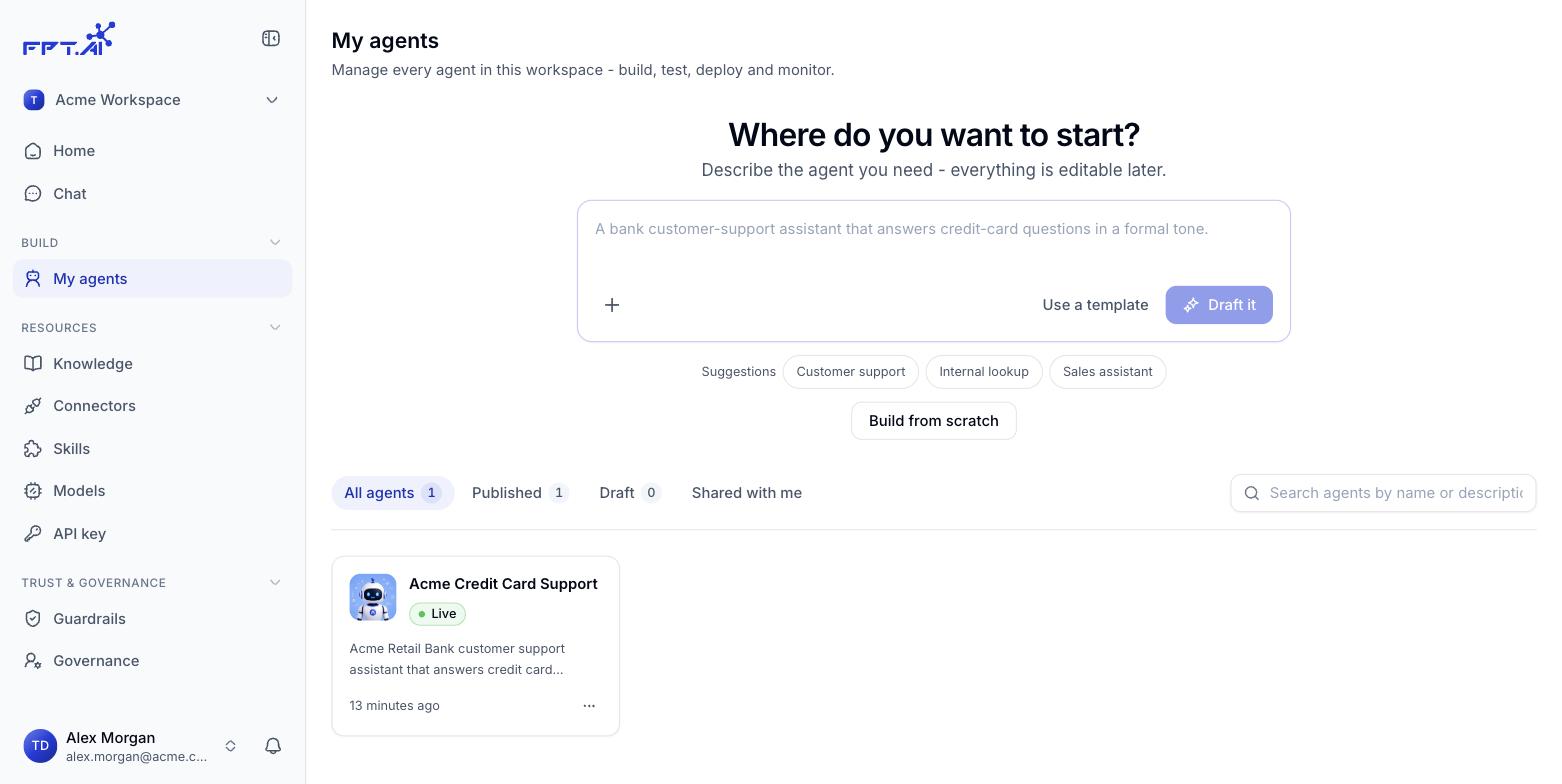
Open **My agents** under **Build** in the navigation bar to see every agent in the workspace - this is where you keep track of which agents are serving, which are still drafts, and where you act on each one.
 ## Filter by status
Four tabs sit above the list, each showing how many agents it holds:
| Tab | Shows |
| - | - |
| **All** | Every agent you have in the workspace |
| **Published** | Agents that have been published and are serving |
| **Drafts** | Agents still being built, never published |
| **Shared** | Agents another workspace has shared with you |
An empty **Shared** tab simply means no workspace has shared an agent with you yet.
## Search
The search box to the right of the tabs matches **agent names and descriptions**. Results filter within the tab you currently have open.
## What an agent card shows
| Element | What it means |
| - | - |
| **Avatar and name** | Quick identification |
| **Status** | `Active` once the agent is published and serving |
| **Short description** | A summary of what the agent does |
| **Last updated** | The most recent edit, for example *19 hours ago*, *2 weeks ago* |
Click a card to open the agent's detail page.
## Quick actions on an agent
Click the **⋯** button in the bottom right corner of any card:
| Action | Result |
| - | - |
| **Edit** | Opens the agent builder |
| **Duplicate** | Creates a copy you can edit separately, leaving the original untouched |
| **Delete** | Removes the agent from the workspace |
Think twice before you **Delete** - unpublish the agent first and check that nobody is still using it.
This documentation is built and hosted on [Mintlify](https://mintlify.com), a developer documentation platform.
## Filter by status
Four tabs sit above the list, each showing how many agents it holds:
| Tab | Shows |
| - | - |
| **All** | Every agent you have in the workspace |
| **Published** | Agents that have been published and are serving |
| **Drafts** | Agents still being built, never published |
| **Shared** | Agents another workspace has shared with you |
An empty **Shared** tab simply means no workspace has shared an agent with you yet.
## Search
The search box to the right of the tabs matches **agent names and descriptions**. Results filter within the tab you currently have open.
## What an agent card shows
| Element | What it means |
| - | - |
| **Avatar and name** | Quick identification |
| **Status** | `Active` once the agent is published and serving |
| **Short description** | A summary of what the agent does |
| **Last updated** | The most recent edit, for example *19 hours ago*, *2 weeks ago* |
Click a card to open the agent's detail page.
## Quick actions on an agent
Click the **⋯** button in the bottom right corner of any card:
| Action | Result |
| - | - |
| **Edit** | Opens the agent builder |
| **Duplicate** | Creates a copy you can edit separately, leaving the original untouched |
| **Delete** | Removes the agent from the workspace |
Think twice before you **Delete** - unpublish the agent first and check that nobody is still using it.
This documentation is built and hosted on [Mintlify](https://mintlify.com), a developer documentation platform.