> ## Documentation Index
> Fetch the complete documentation index at: https://docs-agents.fpt.ai/llms.txt
> Use this file to discover all available pages before exploring further.
# API integration
> For when you already have a chat interface with your customers: receive messages over a webhook, sign with HMAC, get answers back by callback, and reload conversation history
The API channel is for teams that already have a customer conversation channel: their own app, a self-run Zalo OA, a contact centre, a CRM. Your system forwards customer messages to the platform over a webhook; the agent's answers come back to your webhook as callbacks.
Both directions share one secret and one signing scheme, so you write the signature function once and reuse it for sending and receiving.
## Choosing an integration channel
| Criterion | Live Chat | API channel |
| - | - | - |
| Chat interface | Supplied by FPT.AI | Built by you |
| Integration effort | Paste one script tag | Write a receiving webhook and a sending client |
| Answers | Streamed token by token in real time (SSE) | One callback per complete answer |
| Authentication | A `visitorToken` issued automatically per customer | HMAC-SHA256 signature on every packet |
| Customer identity | Generated by the platform (anonymous) | Supplied by you through `user.id` |
| Inbound attachments | Yes | Yes, if an administrator has enabled them |
| Buttons, carousels | Yes | Yes |
The two are not mutually exclusive. One agent can serve the website widget and your system over the API channel at the same time. Each is a separate connection with its own key.
## Environments and domains
| Environment | API channel webhook | History API |
| - | - | - |
| Production | `https://console-agents.fpt.ai` | `https://console-agents.fpt.ai` |
| Staging | `https://console-agents-staging.fpt.ai` | `https://console-agents-staging.fpt.ai` |
Everything sits under one application domain and is told apart by path: the API channel’s inbound message webhook is `https://console-agents.fpt.ai/webhooks/api`, while the history API is `https://console-agents.fpt.ai/direct-bff/…`. Always copy the exact webhook address from Console rather than deriving it.
## Connecting the API channel and getting your keys
Open Console and sign in with your account.
This agent will answer the messages your system forwards.
**Channels** is on the agent's navigation bar.
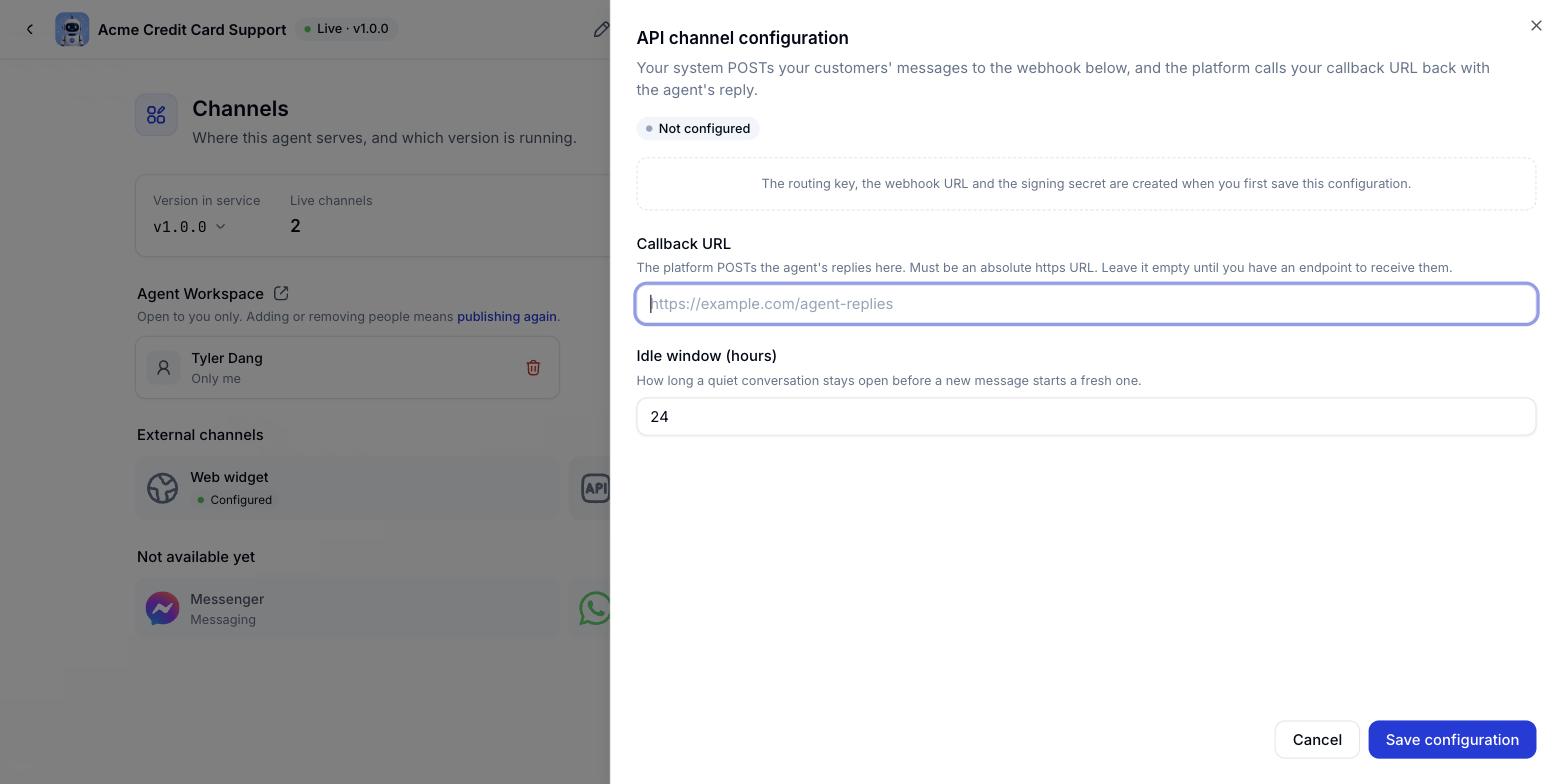
The API channel configuration panel opens.
Two fields - see the table below.
The API tile on the Channels tab switches to **Configured**.
Copy the **routing key** and the **signing key** before you close the dialog.
| Field | Description | Required |
| - | - | - |
| Callback URL | Where the platform sends the agent's answers back to you. Must be `https`, at most 2048 characters, and publicly reachable on the internet. You can leave it empty if your endpoint is not ready; the channel still receives messages, but no answers are sent back | Optional |
| Idle window (hours) | If a conversation goes quiet for longer than this, the customer's next message opens a new one. Between 1 and 720 hours, default 24 | Optional |
The signing key is shown exactly once, at the moment it is created. The system only stores a hash, so there is no way to see it again. Copy it into your secret store before closing the dialog.
### What you get
| Value | Example | What it is |
| - | - | - |
| Routing key | `api_7Kd2xQ9mPz4vR8nLcJt3Aw` | Identifies your connection. Send it in the body's `integrationKey` field, not on the URL |
| Webhook URL | `https://console-agents.fpt.ai/webhooks/api` | Where your system sends customer messages. Shared by every organisation |
| Signing key | (shown once) | The secret used to sign and verify signatures in both directions |
| Callback URL | `https://your-domain.com/agent-replies` | Your webhook, entered in step 5 |
### Testing the callback URL
The **Test callback** button beside the input sends a signed request to your address and expects the right answer back. See Verifying your webhook endpoint below for how to implement it. The button is limited to 10 tests per minute per organisation.
### Rotating the secret
From this moment, both the old and the new key are accepted.
Re-check both the sending and receiving paths.
The old key is disabled. Only the new one works from then on.
Do not skip the last step. The old key keeps working until you finish the rotation, so forgetting it means you have not actually rotated anything.
## Verifying event payloads
Every packet in both directions is signed with HMAC-SHA256 using the channel secret. The signature travels in the `X-Hub-Signature-256` header with a `sha256=` prefix, alongside an `X-Hub-Timestamp` header carrying the send time.
The signed string is the `timestamp`, a dot, and the raw body:
```text theme={null}
mac = HMAC-SHA256(secret, timestamp + "." + rawRequestBody)
```
* Sign the exact bytes you send. Parsing the JSON into an object and re-serialising it, even if only the key order changes, produces a different signature.
* The timestamp is inside the signature, so an attacker who captures a packet cannot alter it. Send the current Unix time in seconds.
* A timestamp more than 5 minutes off the server clock in either direction is rejected. Keep your servers NTP-synced.
* There are no exceptions. There is no signature-skipping mode, and no exemption for connections that have not generated a key.
### Signing in Go
```go theme={null}
package main
import (
"crypto/hmac"
"crypto/sha256"
"encoding/hex"
"fmt"
"strconv"
"time"
)
func sign(secret string, body []byte, timestamp string) string {
h := hmac.New(sha256.New, []byte(secret))
h.Write([]byte(timestamp))
h.Write([]byte("."))
h.Write(body)
return "sha256=" + hex.EncodeToString(h.Sum(nil))
}
func main() {
// The raw body - exactly the bytes that will be sent.
body := []byte(`{"integrationKey":"api_7Kd2xQ9mPz4vR8nLcJt3Aw",` +
`"messageId":"msg-1001","user":{"id":"cust-42"},` +
`"text":"Hello"}`)
secretKey := "my_secret_key"
timestamp := strconv.FormatInt(time.Now().Unix(), 10)
fmt.Println("X-Hub-Timestamp:", timestamp)
fmt.Println("X-Hub-Signature-256:", sign(secretKey, body, timestamp))
}
```
### Signing in Node.js
```js theme={null}
const crypto = require('crypto');
function sign(secret, body, timestamp) {
return 'sha256=' + crypto
.createHmac('sha256', secret)
.update(timestamp + '.' + body)
.digest('hex');
}
// The raw body - exactly the string that will be sent.
const body = JSON.stringify({
integrationKey: 'api_7Kd2xQ9mPz4vR8nLcJt3Aw',
messageId: 'msg-1001',
user: { id: 'cust-42' },
text: 'Hello'
});
const secretKey = 'my_secret_key';
const timestamp = Math.floor(Date.now() / 1000).toString();
console.log('X-Hub-Timestamp:', timestamp);
console.log('X-Hub-Signature-256:', sign(secretKey, body, timestamp));
```
### Verifying signatures the platform sends you
Reuse the same function, then compare with a constant-time comparison so nothing leaks through timing:
```js theme={null}
const express = require('express');
const crypto = require('crypto');
const app = express();
// Required: keep the RAW body so you can compute the signature.
app.use(express.raw({ type: 'application/json' }));
app.post('/agent-replies', (req, res) => {
const ts = req.get('X-Hub-Timestamp') || '';
const got = req.get('X-Hub-Signature-256') || '';
const raw = req.body; // Buffer, not JSON.parse-d
// 1. Check the clock skew first (5 minutes max).
const skew = Math.abs(Math.floor(Date.now() / 1000) - Number(ts));
if (!Number.isFinite(skew) || skew > 300) return res.sendStatus(401);
// 2. Compare signatures.
const want = sign(process.env.CHANNEL_SECRET, raw, ts);
const a = Buffer.from(got), b = Buffer.from(want);
if (a.length !== b.length || !crypto.timingSafeEqual(a, b)) {
return res.sendStatus(401);
}
const event = JSON.parse(raw.toString('utf8'));
// 3. Return 200 IMMEDIATELY, then process asynchronously.
res.sendStatus(200);
handleAsync(event);
});
```
Most signature failures come from a web framework parsing the body into an object before you can read it. Configure it to keep the raw bytes (`express.raw`, `bodyParser.raw`, or read the input stream directly) and parse the JSON only after verification.
## Receiving customer messages
Messages your customers send to your system are forwarded to the platform over the webhook. The event has two parts: the payload, and the signature that authenticates it.
```mermaid theme={null}
sequenceDiagram
participant C as Your core app
participant S as FPT AI Agents Webhook Server
C->>S: POST /webhooks/api - user message event
Note over C,S: Headers X-Hub-Timestamp and X-Hub-Signature-256
S->>S: Verify HMAC-SHA256
S->>S: Replay protection by messageId
S->>S: Process the event, hand it to AI Agents
S-->>C: 200 OK
```
| HTTP Method | URI |
| - | - |
| POST | `/webhooks/api` |
| HTTP header | Value |
| - | - |
| `Content-Type` | `application/json` |
| `X-Hub-Timestamp` | Unix time in seconds |
| `X-Hub-Signature-256` | `sha256=…` |
### A text message
```json theme={null}
{
"integrationKey": "api_7Kd2xQ9mPz4vR8nLcJt3Aw",
"messageId": "msg-1001",
"user": {
"id": "cust-42",
"name": "Nguyen Van A",
"avatar": "https://example.com/avatar.png",
"locale": "vi"
},
"text": "Where is my order?",
"metadata": { "orderId": "SO-7781" }
}
```
### A message from a button or quick reply
```json theme={null}
{
"integrationKey": "api_7Kd2xQ9mPz4vR8nLcJt3Aw",
"messageId": "msg-1002",
"user": { "id": "cust-42" },
"text": "Track order",
"postback": "track:SO-7781"
}
```
### A message with an attachment
```json theme={null}
{
"integrationKey": "api_7Kd2xQ9mPz4vR8nLcJt3Aw",
"messageId": "msg-1003",
"user": { "id": "cust-42" },
"text": "Here is a photo of the faulty product",
"attachments": [
{
"url": "https://example.com/files/faulty-product.jpg",
"name": "faulty-product.jpg",
"mimeType": "image/jpeg"
}
]
}
```
### Parameters
| Parameter | Example | Description | Required |
| - | - | - | - |
| `integrationKey` | `api_7Kd2xQ9…` | The channel routing key from Console. Up to 256 characters | Required |
| `messageId` | `msg-1001` | A message id you generate. It is the end-to-end deduplication key. Up to 256 characters | Required |
| `user` | | The sender object | Required |
| `user.id` | `cust-42` | The customer's id in your system. Up to 256 characters | Required |
| `user.name` | `Nguyen Van A` | Customer name. Up to 256 characters | Optional |
| `user.avatar` | `https://…/a.png` | Customer picture. Up to 2048 characters | Optional |
| `user.locale` | `vi` | The customer's language. Up to 256 characters | Optional |
| `text` | `Where is my order?` | The message content. Up to 16,384 characters. Always required, even when `postback` is present | Required |
| `postback` | `track:SO-7781` | The hidden payload of the button or quick reply they tapped. Up to 1024 characters | Optional |
| `metadata` | `{"orderId":"SO-7781"}` | Your own additional data. Up to 32 keys and 8192 bytes once JSON-encoded | Optional |
| `attachments` | | The attachment list. Up to 5 items | Optional |
| `attachments[].url` | `https://…/a.jpg` | The file URL; the platform downloads it. Up to 2048 characters | Required |
| `attachments[].name` | `photo.jpg` | File name. Up to 256 characters | Optional |
| `attachments[].mimeType` | `image/jpeg` | The file's content type | Optional |
`text` is always required, even for a message that only carries a `postback`. The customer's turn is stored and shown to staff when they take over the conversation, so a wordless `postback` leaves an empty bubble in their inbox. Send the button label as `text`.
`postback` reaches the agent as separate context and is never treated as something the customer said. That is how the agent tells apart what a person typed from what your interface carried along. One field covers both buttons and quick replies.
### A cURL example
```bash theme={null}
curl --location 'https://console-agents.fpt.ai/webhooks/api' \
--header 'Content-Type: application/json' \
--header 'X-Hub-Timestamp: 1755763200' \
--header 'X-Hub-Signature-256: sha256=c22b7f7c1957fb301d6181c5fbf4dc841d735af48ddc14e9a4dade1658fdc3e5' \
--data '{
"integrationKey": "api_7Kd2xQ9mPz4vR8nLcJt3Aw",
"messageId": "msg-1001",
"user": { "id": "cust-42", "name": "Nguyen Duc Minh" },
"metadata": { "customer_id": "2449956338403583" },
"text": "hello"
}'
```
### Response codes
| Status | Meaning | What to do |
| - | - | - |
| 200 | Accepted | Nothing. The agent answers asynchronously by callback |
| 400 | Invalid body: bad JSON, a missing required field, or a field over its limit | Fix the request. Retrying will not help |
| 401 | Invalid signature or timestamp | Check the secret and the server clock. The empty response body is deliberate |
| 405 | Wrong method | Only POST is accepted |
| 503 | The platform could not accept it | Retry with backoff. This is not a rejected message |
200 means **accepted**, not answered. The agent works asynchronously and the answer reaches your webhook afterwards.
### Deduplication
`messageId` is the end-to-end deduplication key. A message with the same (`integrationKey`, `messageId`) pair resent within 5 minutes is recognised and skipped, so retrying after a timeout does not give your customer two answers.
Use your own stable message id. Do not generate a new one per retry - that disables deduplication entirely.
### Inbound attachments
Each item in `attachments` needs a `url` the platform can fetch. The file contents are copied into your organisation's storage and handed to the agent, so the URL you supply does not need to live long afterwards.
Attachment upload is off until an administrator enables it. When it is off, and for any file that is over the limit or fails to download, the file is skipped but `text` still reaches the agent. A message with attachments is therefore never an error, and you cannot tell from the response code whether the file was taken.
### Additional data
Your `metadata` object reaches the agent nested under `client_metadata`. It is never merged into the top level, because the keys there - the recipient identifiers above all - decide who the answer goes to.
Unknown fields at the top level of the body are ignored, so you can add your own without being rejected.
## Agent message callbacks
The agent's answers are sent to your webhook as a signed POST. Like the inbound direction, the event has two parts: the payload and its signature.
```mermaid theme={null}
sequenceDiagram
participant M as Message Dispatching
participant W as Your API webhook
M->>W: POST callback_url - the agent's answer
Note over M,W: Header X-Hub-Signature-256
W->>W: Verify HMAC-SHA256
W->>W: Deduplicate by eventId
W->>W: Deliver the answer to the user
W-->>M: 200 OK
Note over M,W: Anything other than 2xx is retried up to 3 times (1s, 3s, 9s) then moved to the DLQ
```
### Verifying your webhook endpoint
Before the first real message, you can ask the platform to prove your endpoint is the one it thinks it is. The **Test callback** button on Console sends a signed request:
```mermaid theme={null}
sequenceDiagram
participant P as FPT AI Agents Platform
participant W as Your webhook server
P->>W: POST callback_url - type verification, challenge 6326e43c...
W->>W: Verify the X-Hub-Signature-256 signature
W-->>P: 200 OK with challenge 6326e43c...
P->>P: Compare the challenge
Note over P,W: A match gives ok, a mismatch gives challenge_mismatch
```
```json theme={null}
{
"type": "verification",
"challenge": "6326e43c9f0b4a1d8e77c0b511a2d3f4",
"occurredAt": "2026-09-07T11:08:40Z"
}
```
To pass, return a 2xx with a JSON body echoing the exact `challenge`:
```js theme={null}
app.post('/agent-replies', (req, res) => {
// ... verify the signature as above ...
const event = JSON.parse(raw.toString('utf8'));
if (event.type === 'verification') {
return res.json({ challenge: event.challenge });
}
res.sendStatus(200);
handleAsync(event);
});
```
* The verification request is signed exactly like every other packet, so the function you already wrote works on it.
* `type` only appears on verification requests, never on a real message.
* Echoing `challenge` is mandatory. A bare 200 is not enough: a parked domain, a CDN error page and a load balancer all return 200.
* Each verification uses a different `challenge`.
* The platform does not follow redirects. A 301, 302 or 303 loses the request body, so it can never echo correctly.
* Nothing is stored. A pass means your endpoint answered correctly at that moment.
| Failure reason | What it means and what to do |
| - | - |
| `no_secret` | There is no secret yet, so the platform cannot sign. Generate a key first |
| `url_forbidden` | Not an absolute `https` URL, or it resolves to a non-public address |
| `unreachable` | Could not connect. Check the service is running and reachable from the internet |
| `http_status` | The endpoint returned a non-2xx code; the exact one is in the `httpStatus` field |
| `challenge_mismatch` | Returned 2xx but did not echo the `challenge` |
### The callback event structure
```http theme={null}
POST
Content-Type: application/json
User-Agent: fpt-agent-platform-channel-gateway/1
X-Hub-Timestamp: 1755763260
X-Hub-Signature-256: sha256=…
```
| Field | Type | Description |
| - | - | - |
| `eventId` | string | The event id, stable across retries. Use it as the deduplication key |
| `integrationKey` | string | The channel routing key |
| `conversationId` | string | The conversation id. This is the value you pass to the history API. Store it |
| `runId` | string | The id of one answer turn. A new value each turn |
| `from` | `bot` or `operator` | Whether this turn came from the agent or from a human who took over |
| `user.id` | string | The customer id, exactly as you sent it |
| `text` | string | The text content. Always present, even alongside buttons or carousels |
| `buttons` | Array\
 | Field | Description | Required |
| - | - | - |
| Callback URL | Where the platform sends the agent's answers back to you. Must be `https`, at most 2048 characters, and publicly reachable on the internet. You can leave it empty if your endpoint is not ready; the channel still receives messages, but no answers are sent back | Optional |
| Idle window (hours) | If a conversation goes quiet for longer than this, the customer's next message opens a new one. Between 1 and 720 hours, default 24 | Optional |
| Field | Description | Required |
| - | - | - |
| Callback URL | Where the platform sends the agent's answers back to you. Must be `https`, at most 2048 characters, and publicly reachable on the internet. You can leave it empty if your endpoint is not ready; the channel still receives messages, but no answers are sent back | Optional |
| Idle window (hours) | If a conversation goes quiet for longer than this, the customer's next message opens a new one. Between 1 and 720 hours, default 24 | Optional |