> ## Documentation Index
> Fetch the complete documentation index at: https://docs-agents.fpt.ai/llms.txt
> Use this file to discover all available pages before exploring further.
# Agent 一覧
> ワークスペースのすべての Agent を見る、探す、管理する
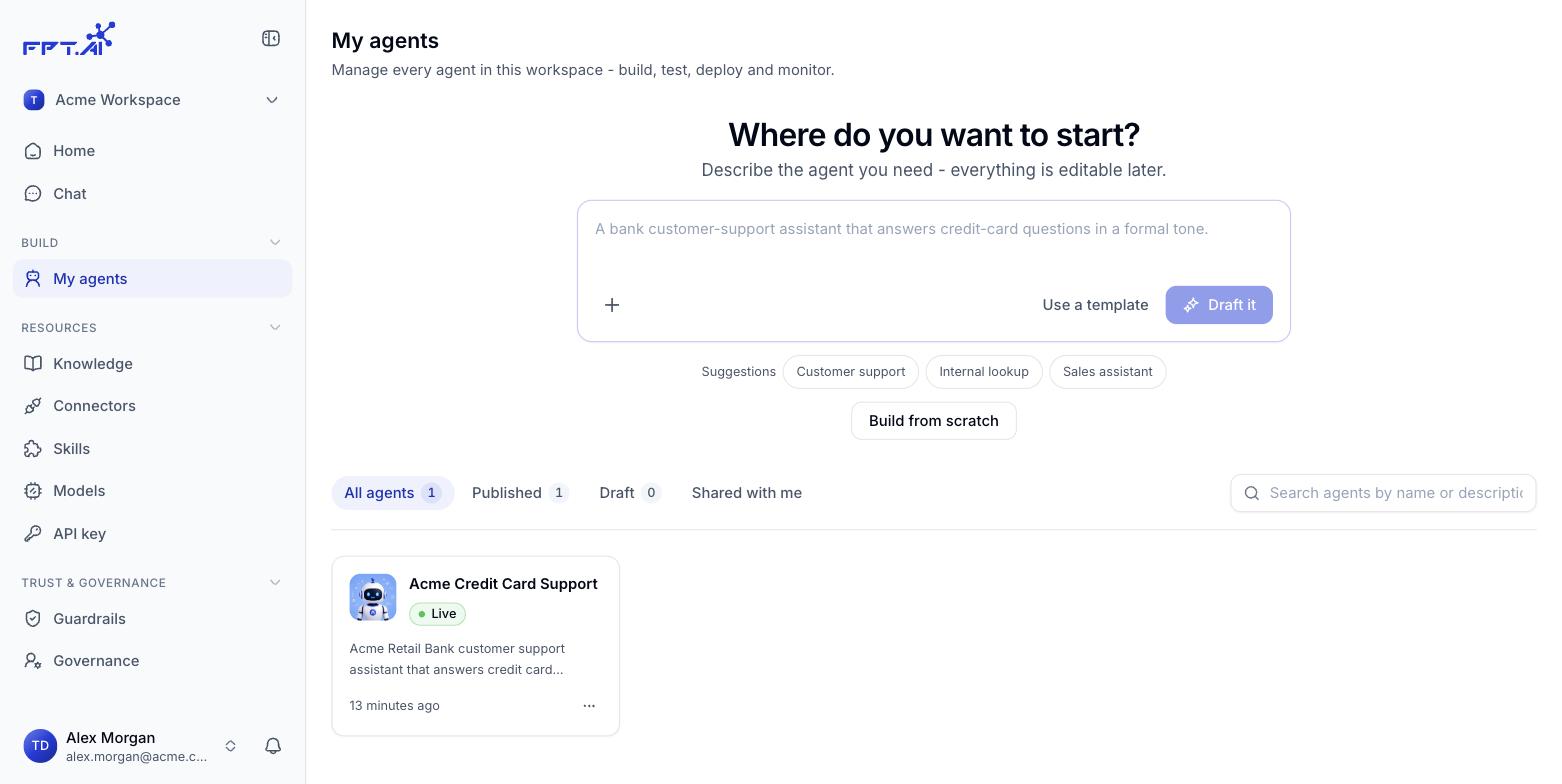
ナビゲーションバーの **構築** にある **マイエージェント** を開くと、ワークスペースのすべての Agent が並びます。どれが稼働中でどれが下書きかを把握し、Agent ごとに手を加えるのはこの画面です。
 ## 状態で絞り込む
一覧の上に 4 つのタブがあり、それぞれ件数が付いています。
| タブ | 表示される Agent |
| - | - |
| **すべて** | ワークスペースにあるすべての Agent |
| **公開済み** | 公開されて稼働している Agent |
| **下書き** | 作成中で、まだ一度も公開していない Agent |
| **共有** | ほかのワークスペースから共有された Agent |
**共有** タブが空なのは、まだどのワークスペースからも Agent を共有されていないというだけです。
## 検索
タブの右にある検索ボックスは **Agent の名前と説明** を対象にします。結果はいま開いているタブの中で絞り込まれます。
## Agent カードに出る情報
| 要素 | 意味 |
| - | - |
| **アイコンと名前** | ひと目で見分けるため |
| **状態** | 公開されて稼働していれば `Active` |
| **短い説明** | その Agent が何をするかの要約 |
| **最終更新** | 直近の編集。たとえば *19 時間前*、*2 週間前* |
カードをクリックすると Agent の詳細ページが開きます。
## カードからのクイック操作
カード右下の **⋯** ボタンをクリックします。
| 操作 | 結果 |
| - | - |
| **編集** | Agent ビルダーを開く |
| **複製** | 元はそのままに、別々に編集できるコピーを作る |
| **削除** | ワークスペースから Agent を取り除く |
**削除** の前に一度立ち止まってください。先に公開を取り下げ、まだ使っている人がいないことを確かめてからにしましょう。
This documentation is built and hosted on [Mintlify](https://mintlify.com), a developer documentation platform.
## 状態で絞り込む
一覧の上に 4 つのタブがあり、それぞれ件数が付いています。
| タブ | 表示される Agent |
| - | - |
| **すべて** | ワークスペースにあるすべての Agent |
| **公開済み** | 公開されて稼働している Agent |
| **下書き** | 作成中で、まだ一度も公開していない Agent |
| **共有** | ほかのワークスペースから共有された Agent |
**共有** タブが空なのは、まだどのワークスペースからも Agent を共有されていないというだけです。
## 検索
タブの右にある検索ボックスは **Agent の名前と説明** を対象にします。結果はいま開いているタブの中で絞り込まれます。
## Agent カードに出る情報
| 要素 | 意味 |
| - | - |
| **アイコンと名前** | ひと目で見分けるため |
| **状態** | 公開されて稼働していれば `Active` |
| **短い説明** | その Agent が何をするかの要約 |
| **最終更新** | 直近の編集。たとえば *19 時間前*、*2 週間前* |
カードをクリックすると Agent の詳細ページが開きます。
## カードからのクイック操作
カード右下の **⋯** ボタンをクリックします。
| 操作 | 結果 |
| - | - |
| **編集** | Agent ビルダーを開く |
| **複製** | 元はそのままに、別々に編集できるコピーを作る |
| **削除** | ワークスペースから Agent を取り除く |
**削除** の前に一度立ち止まってください。先に公開を取り下げ、まだ使っている人がいないことを確かめてからにしましょう。
This documentation is built and hosted on [Mintlify](https://mintlify.com), a developer documentation platform.